반응형
ArrayList
import java.util.ArrayList;

public class ArrayListTest {

	public static void main(String[] args) {
		// TODO Auto-generated method stub

		// 우리는 배열을 배웟다.
		// 사람이름을 저장하는 배열을 만든다고 가정했을때
		// 배열은 생성시에 갯수를 정해줘야 한다.
		// 배열은 한번 갯수를 정하면 그 갯수 이상으로는 데이터를 추가할 수 없다.
		// 이게 단점이다.
		// String[] nameArray = new String[10];

		// 그렇기에 불편함을 느낀 사람들이 만들어 놓은게 ArrayList이다.
		// 따라서 ArrayList는 갯수를 정하지 않고 데이터를 마음대로 추가, 삭제 할 수 있다.
		// 비어있는 ArrayList의 문법은 아래와 같다.
		// ArrayList는 < > 부등호 안에 담고싶은 데이터를 적어줘야 한다.
		// <> 다음은 변수이름, =의 오른쪽은 데이터, 즉, 생성자(비어있는 리스트)
		ArrayList<String> nameList = new ArrayList<String>();


		// ArrayList에 데이터 추가하는 방법
		nameList.add("홍길동");
		nameList.add("김나나");
		nameList.add("Mike");

		// ArrayList 데이터 accessing
		System.out.println( nameList.get(0) );
		System.out.println( nameList.get(1) );
		System.out.println( nameList.get(2) );

		System.out.println("--------------------------------");

		// ArrayList에 있는 데이터를 모두 출력
		// ArrayList는 length가 아닌 size를 사용한다.
		// nameList.size()는 저장되어잇는 데이터의 갯수
		for(int i = 0 ; i < nameList.size(); i++) {
			System.out.println(nameList.get(i));
		}

		System.out.println("--------------------------------");

		// 현제 데이터는 홍길동, 김나나, Mike가 있다.
		// Harry를 홍길동과 김나나 사이에 추가 (python의 insert와 같음)
		nameList.add(1, "Harry");

		for(int i = 0 ; i < nameList.size(); i++) {
			System.out.println(nameList.get(i));
		}

		System.out.println("--------------------------------");

		// 데이터 삭제 remove
		// index를 넣어 삭제, object를 넣어 삭제 가능하다.
		nameList.remove(0);

		for(int i = 0 ; i < nameList.size(); i++) {
			System.out.println(nameList.get(i));
		}

		System.out.println("--------------------------------");

		nameList.remove("Mike");

		for(int i = 0 ; i < nameList.size(); i++) {
			System.out.println(nameList.get(i));
		}

		System.out.println("--------------------------------");

		// 저장된 데이터 전체 삭제
		nameList.clear();

		System.out.println( nameList.size() );

		System.out.println("--------------------------------");

		// 리스트가 비어잇는지 확인하는 코드

		nameList.isEmpty();

		if( nameList.isEmpty() ) {
			System.out.println("데이터 없음.");
		} else {
			System.out.println("데이터 있음.");
		}


	}

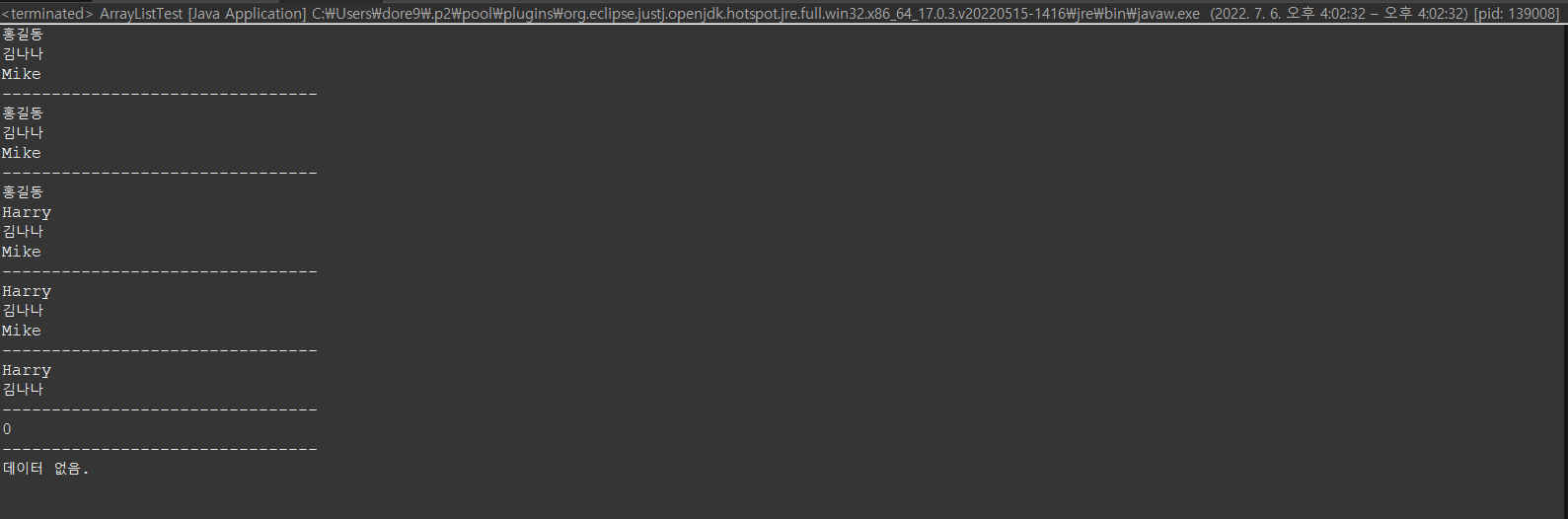
}
반응형
'Language > JAVA' 카테고리의 다른 글
| JAVA - 예외처리(Try Catch Finally) (0) | 2022.07.07 |
|---|---|
| JAVA - HashMap ( Iterator를 이용해 데이터 가져오기 ) (0) | 2022.07.06 |
| JAVA - String Func (0) | 2022.07.06 |
| JAVA - Interface (0) | 2022.07.06 |
| JAVA - Abstract (추상클래스) (0) | 2022.07.06 |


