반응형
Python MySQL Connector를 이용해 update 하는 방법
1. VS Code recipe.py 파일 만들기
from http import HTTPStatus
from flask import request
from flask_restful import Resource
from mysql.connector.errors import Error
from mysql_connection import get_connection
import mysql.connector

class RecipeResource(Resource) :

# 데이터를 업데이트하는 API들은 PUT 함수를 사용한다.
    def put(self, recipe_id) :

        # body에서 전달된 데이터를 처리
        data = request.get_json()

        # DB 업데이트 실행 코드
        try :
            # 데이터 insert
            #1. DB에 연결
            connection = get_connection()
            #2. 쿼리문 만들기
            query = '''update recipe
                    set name = %s, description = %s,
                    cook_time = %s, directions = %s
                    where id = %s ;'''

            record = ( data['name'], data['description'], data['cook_time'], data['directions'], recipe_id )

            #3. 커서를 가져온다.
            cursor = connection.cursor()
            #4. 쿼리문을 커서를 이용해서 실행한다.
            cursor.execute(query, record)
            #5. 커넥션을 커밋해줘야 한다. => 디비에 영구적으로 반영하라는 뜻
            connection.commit()
            #6. 자원 해제
            cursor.close()
            connection.close()

        # 정상적이지 않을때
        except mysql.connector.Error as e :
            print(e)
            cursor.close()
            connection.close()

            return {'error' : str(e)}, 503


        return {'result' : 'success'}, 200
2. 경로와 resource(API 코드)를 연결
from flask import Flask
from flask_restful import Api

from resources.recipe import RecipeListResource
from resources.recipe_info import RecipeResource


app = Flask(__name__)

api = Api(app)

# 경로와 resource(API 코드)를 연결한다.
api.add_resource(RecipeListResource, '/recipes')
api.add_resource(RecipeResource, '/recipes/<int:recipe_id>')


if __name__ == '__main__' :
    app.run()
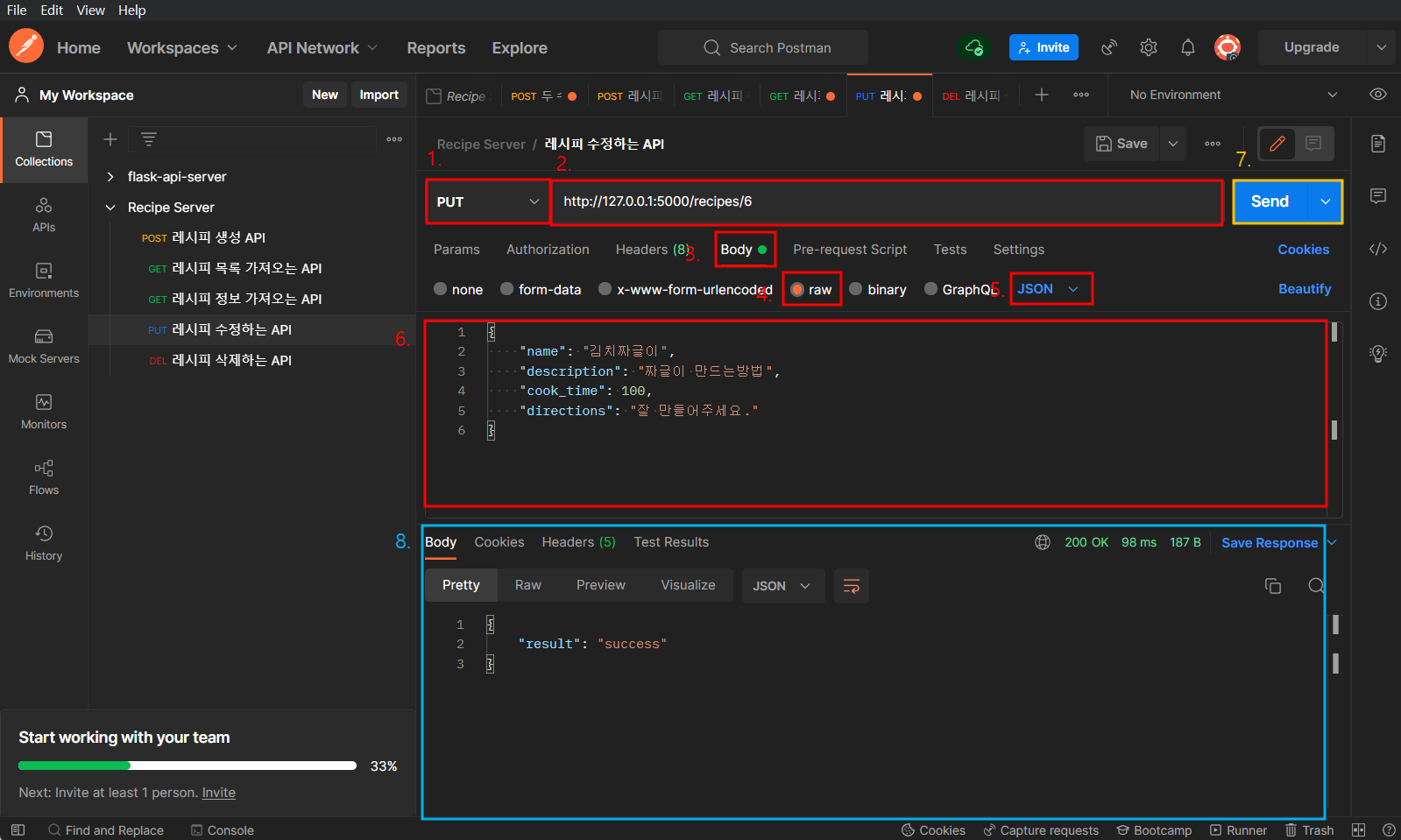
3. python app.py 실행 후 POSTMAN으로 test
4. MySQL에서 데이터 확인

반응형
'BackEnd' 카테고리의 다른 글
| API - Python flask에서, Resource 클래스를 이용한 API 서버 개발 방법 (0) | 2022.06.19 |
|---|---|
| API - Python MySQL Connector를 이용해 delete 하는 방법 (0) | 2022.06.19 |
| API - Python MySQL Connector를 이용해 select 하는 방법 (0) | 2022.06.19 |
| API - Python MySQL Connector를 이용해 insert 하는 방법 (0) | 2022.06.19 |
| API - API , Restful API (0) | 2022.06.18 |


