반응형
Python용 AWS Library 인 boto3 library를 이용해 S3 파일 업로드하기
S3에만 Image file upload
from datetime import datetime
from http import HTTPStatus
from os import access
from flask import request
from flask_jwt_extended import create_access_token, get_jwt, get_jwt_identity, jwt_required
from flask_restful import Resource
from mysql.connector.errors import Error
from config import Config
import boto3


class FileUploadResource(Resource) :

    def post(self) :

        # 1. 클라이언트로부터 데이터를 받아온다.
        # request.files 에 파일을 받아온다.
        # 따라서 파일이 없는 상태로 API 가 호출되면, 에러메세지를
        # 클라이언트에 응답해주자.

        # photo란, 클라이언트에서 보내는 key !!
        if 'photo' not in request.files:
            return {'error' : '파일을 업로드 하세요'}, 400

        # 클라이언트로부터 파일을 받아온다.
        file = request.files['photo']

        # 파일명을 우리가 변경해 준다.
        # 파일명은, 유니크하게 만들어야 한다.
        current_time = datetime.now()
        new_file_name = current_time.isoformat().replace(':', '_') + '.jpg'

        # 유저가 올린 파일의 이름을, 내가 만든 파일명으로 변경
        file.filename = new_file_name

        # S3 에 업로드 하면 된다.
        # AWS 의 라이브러리를 사용해야 한다.
        # 이 파이썬 라이브러리가 boto3 라이브러리다!
        # boto3 라이브러리 설치
        # pip install boto3

        s3 = boto3.client('s3',
                    aws_access_key_id = Config.ACCESS_KEY,
                    aws_secret_access_key = Config.SECRET_ACCESS)

        try :
            s3.upload_fileobj(file,
                                Config.S3_BUCKET,
                                file.filename,
                                ExtraArgs = {'ACL':'public-read', 'ContentType':file.content_type} )

        except Exception as e :
            return {'error' : str(e)}, 500

        return {'result' : 'success',
                'imgUrl' : Config.S3_LOCATION + file.filename}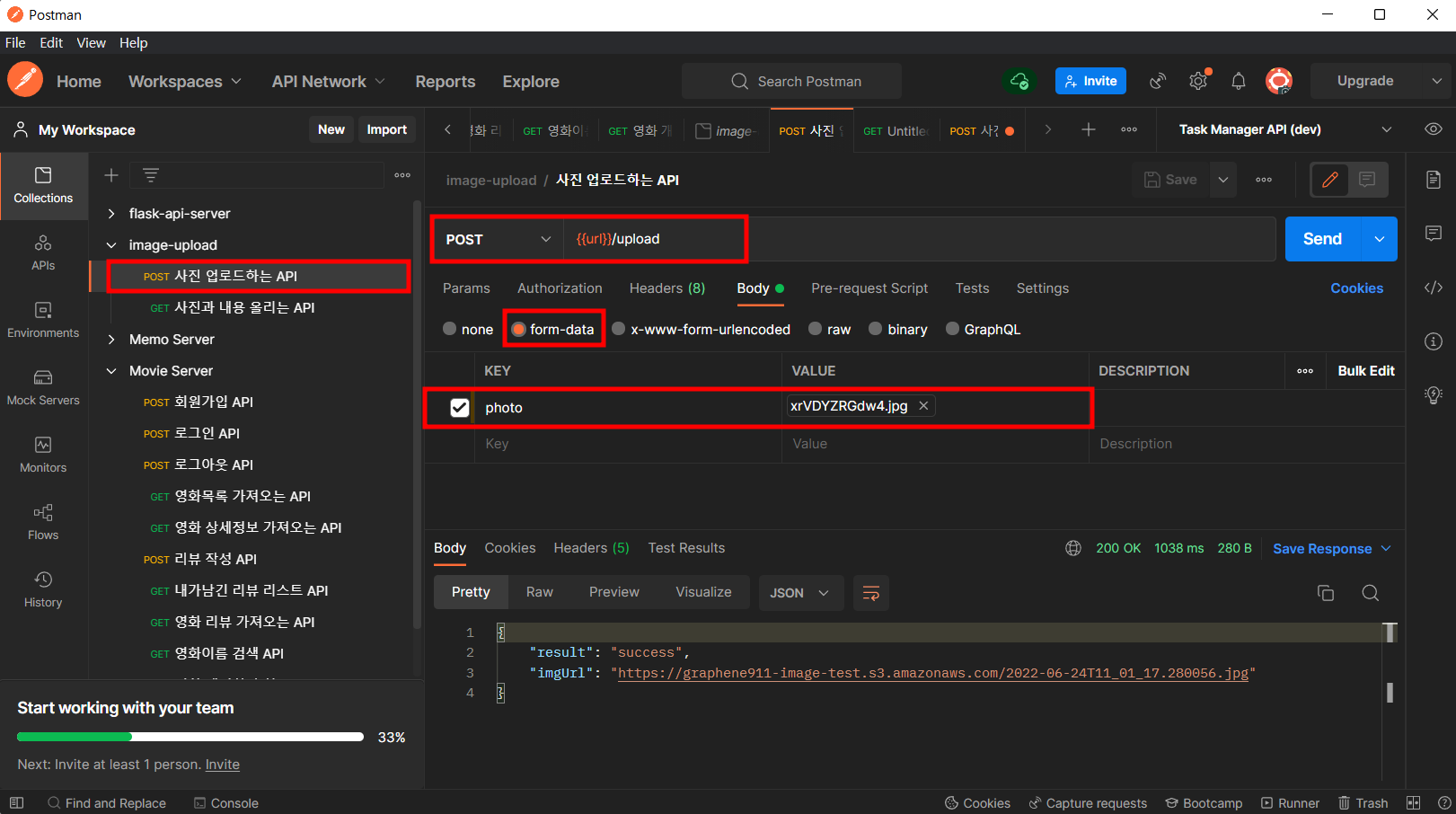
S3에서 확인

DB와 S3에 Image File, Content Upload
from datetime import datetime
from http import HTTPStatus
from flask import request
from flask_jwt_extended import get_jwt_identity, jwt_required
from flask_restful import Resource
from mysql.connector.errors import Error
from mysql_connection import get_connection
import mysql.connector
from config import Config
import boto3


class PostingResource(Resource) :
    def post(self) :

        # 클라이언트로부터 데이터를 받아온다.
        # photo => file , content => text

        if 'photo' not in request.files:
            return {'error' : '파일을 업로드 하세요'}, 400


        file = request.files['photo']
        content = request.form['content']

        # s3에 파일 업로드

        # 클라이언트로부터 파일을 받아온다.
        file = request.files['photo']

        # 파일명을 우리가 변경해 준다.
        # 파일명은, 유니크하게 만들어야 한다.
        current_time = datetime.now()
        new_file_name = current_time.isoformat().replace(':', '_') + '.jpg'

        # 유저가 올린 파일의 이름을, 내가 만든 파일명으로 변경
        file.filename = new_file_name

        # S3 에 업로드 하면 된다.
        # AWS 의 라이브러리를 사용해야 한다.
        # 이 파이썬 라이브러리가 boto3 라이브러리다!
        # boto3 라이브러리 설치
        # pip install boto3

        s3 = boto3.client('s3', aws_access_key_id = Config.ACCESS_KEY, aws_secret_access_key = Config.SECRET_ACCESS)

        try :
            s3.upload_fileobj(file, Config.S3_BUCKET, file.filename, ExtraArgs = {'ACL':'public-read', 'ContentType':file.content_type} )

        except Exception as e :
            return {'error' : str(e)}, 500


        # DB에 저장
        # 받아온 데이터를 디비 저장하면 된다.
        try :
            # 데이터 insert
            # 1. DB에 연결
            connection = get_connection()

            # 2. 쿼리문 만들기
            query = '''insert into posting
                    ( content, imgUrl )
                    values
                    ( %s , %s );'''

            record = (content, new_file_name)

            # 3. 커서를 가져온다.
            cursor = connection.cursor()

            # 4. 쿼리문을 커서를 이용해서 실행한다.
            cursor.execute(query, record)

            # 5. 커넥션을 커밋해줘야 한다 => 디비에 영구적으로 반영하라는 뜻
            connection.commit()

            # 6. 자원 해제
            cursor.close()
            connection.close()

        except mysql.connector.Error as e :
            print(e)
            cursor.close()
            connection.close()
            return {"error" : str(e)}, 503

        return {"result" : "success"}, 200
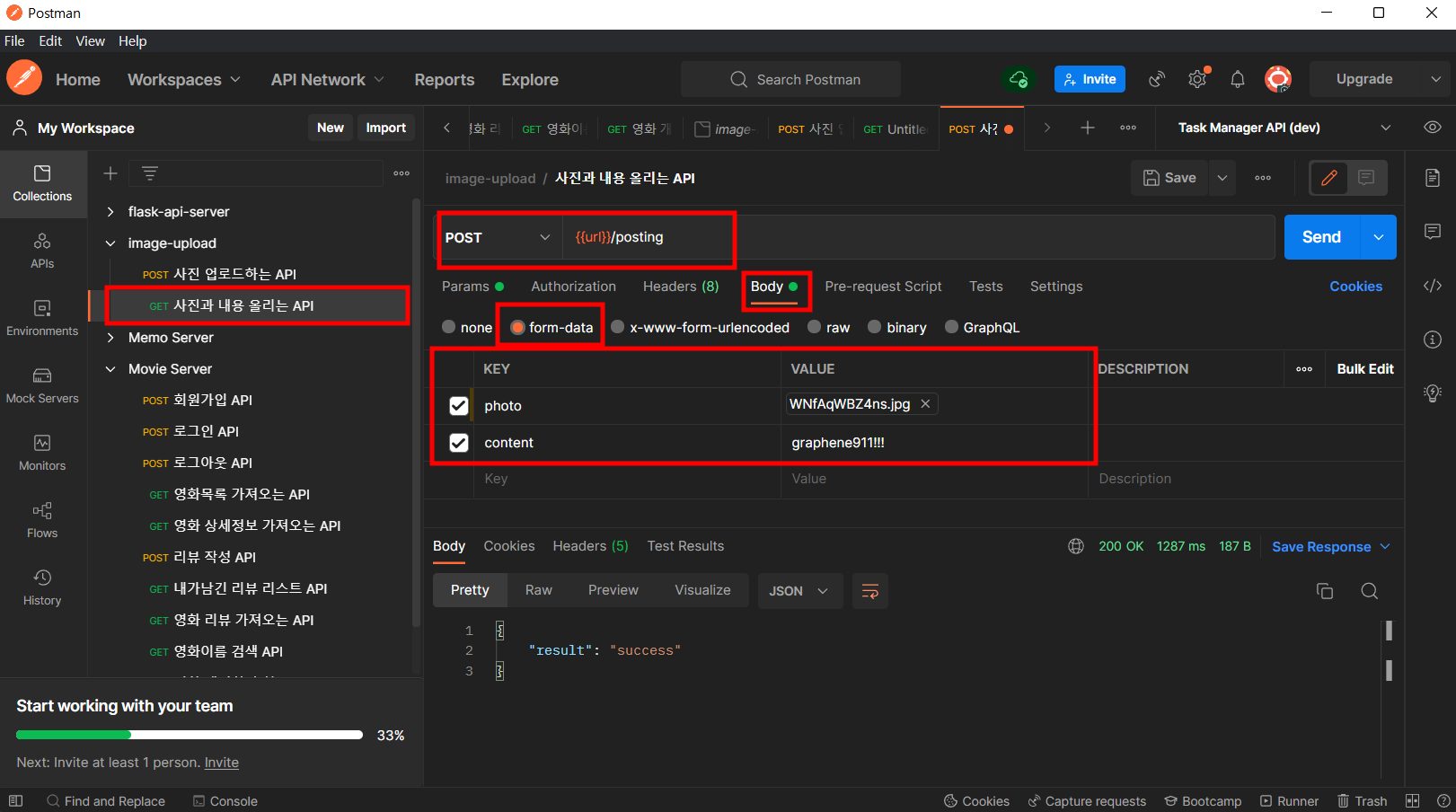
S3에서 확인

MySQL Workbench에서 확인

반응형
'BackEnd' 카테고리의 다른 글
| API - NAVER PAPAGO Open API 사용하기 (0) | 2022.06.30 |
|---|---|
| API - Amazon Rekognition 사용해 이미지 객체식별 API 만들기 (0) | 2022.06.25 |
| API - JWT를 이용해 LOGOUT 기능 만들기 (0) | 2022.06.21 |
| API - email 주소형식이 제대로 된 주소형식인지 확인하는 코드 (0) | 2022.06.20 |
| API - PASSWORD 암호화 설정 방법 (0) | 2022.06.20 |


